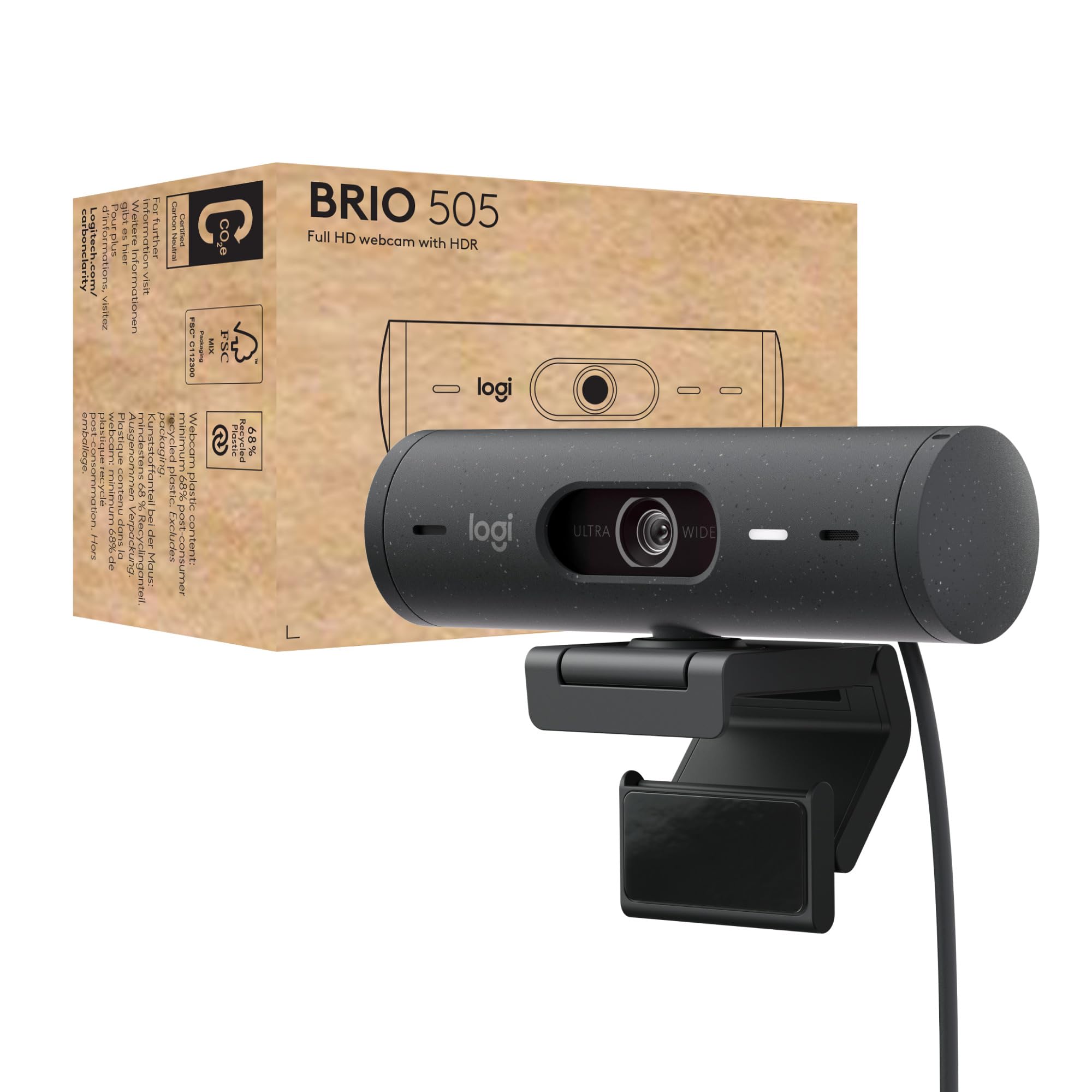
The Best Webcams for Work — Logitech Brio 505 Tops the List
A reliable, business-ready 1080p webcam: Brio 505 fixes low-light, auto-frames you, and keeps meetings private without paying for 4K.
Shortlistd Editorial
Editor
By Editorial Team | April 2026
Intro: The Logitech Brio 505 is our pick for the best webcam for work because it delivers predictable, business-ready 1080p video with better low-light handling, auto-framing and a physical privacy shutter—everything you actually need for hybrid meetings. It scores 7.1 in our evaluation for balancing image quality, framing features and price.
Our picks at a glance
| Pick | Product | Price | Best for |
|---|---|---|---|
| Best overall | Logitech Brio 505 | £49.99 | Hybrid workers who want dependable 1080p video, simple privacy and easy framing for demos |
| Best upgrade | Razer Kiyo Pro Ultra | £299.99 | Creators and streamers who need 4K detail or 1080p/60 for high-motion content |
| Best budget | Logitech C922 Pro | £79 | Beginners who want plug‑and‑play 1080p/30 and a 720p/60 mode for smoother motion |
Based on hands-on reviews, expert consensus (Wirecutter/RTings), and current UK pricing checks.
Best overall: Logitech Brio 505
Logitech Brio 505 — £49.99
If your workday is full of Teams, Zoom or Meet calls, the Brio 505 does the few things that matter better than a laptop camera: clearer exposure in dim rooms, straightforward auto-framing that keeps you centred, and a tactile privacy shutter to stop worrying about being seen. (Score: 7.1)
Why we picked it:
- RightLight 4 with HDR noticeably improves exposure compared with most built-in laptop cameras, so you don’t look like a shadow in backlit meetings.
- Three field-of-view presets (90°/78°/65°) plus AI auto-framing let you switch between group shots, desk demos and tight headshots without moving hardware.
- Integrated privacy shutter and a detachable universal mount clip make setup and privacy idiot‑proof for hybrid teams.
The trade-off: It tops out at 1080p/30fps, so you’ll notice less smooth motion than webcams offering 1080p/60 or 4K — not ideal for fast-action streaming or high-frame tutorials.
Buy one here if you need predictable meeting video and simple privacy controls: https://www.amazon.co.uk/Logitech-correction-auto-framing-reduction-privacy/dp/B07W6HPP3T?tag=tomisindev-20
Best upgrade: Razer Kiyo Pro Ultra
Razer Kiyo Pro Ultra — £299.99
Paying up gets you a much larger sensor, real 4K at 30fps and 1080p at 60fps for smooth, high-detail video. The Kiyo Pro Ultra targets creators who want DSLR-like clarity, better background separation and advanced UHDR processing that keeps skin tones accurate in uneven lighting.
Worth it if: you produce recorded video or stream regularly and need the extra resolution and frame-rate flexibility for editing or smoother motion.
Best budget pick: Logitech C922 Pro
Logitech C922 Pro — £79
This is the pragmatic choice: 1080p at 30fps plus a 720p/60 option gives you usable HD detail or smoother motion when you need it. It’s plug‑and‑play, usually cheaper than premium models, and covers the common flaws of laptop cameras without the price tag.
Trade-off: you’ll miss advanced HDR balancing and the finer low-light handling of models with bigger sensors.
Worth it if: you want a no-fuss webcam that noticeably improves meeting and beginner-stream quality for a modest outlay.
How we chose
We prioritized what actually matters for remote and hybrid work: clear exposure in poor light, field-of-view options and reliable auto-framing, decent built-in mics for short-range calls, privacy hardware and price. Sources: Logitech specs, product pages, pricing aggregators, expert reviews (Wirecutter, RTings) and user threads on Reddit discussing real-world meeting performance.
Frequently asked questions
Do I need an external webcam if my laptop already has one? If you care how you appear on video—sharper image, better exposure and reliable framing—yes. Laptop cameras are fine for casual calls but external webcams like the Brio 505 give predictable results in dim rooms and let you position the lens independently of the laptop screen.
Is the Brio 505 worth the price? At roughly £50 it’s a clear step up from built-in cameras: better low-light exposure, framing presets, Show Mode for demos and a physical privacy shutter. If you need 4K or 1080p/60 for streaming, spend more; otherwise it’s good value for meetings.
Will it work with my device and software? Yes—USB‑C plug-and-play works on Windows, macOS and most Chromebooks, but advanced Logi Tune controls can be limited on Chrome OS; macOS and Windows users get the most feature access.
Products in this article