Best key lights for streamers
The K20 gives the best colour control and a physical remote for £49.99 — great for desk creators; upgrade only if you need much more brightness.
Shortlistd Editorial
Editor
Best key lights for streamers
By Editorial Team | April 2026
Intro
- Bad lighting makes you look tired, flat, or unprofessional on stream and in meetings. The K20 Key Light fixes that quickly — wide 2500–9000K tonal control, CRI >90 for natural skin, and a magnetised remote that syncs multiple panels. If you want an inexpensive, easy-to-use desk key light that gives reliable colour matching across setups, this is the one we recommend.
Our picks at a glance
| Pick | Product | Price | Best for |
|---|---|---|---|
| Best overall | K20 Key Light | £49.99 | Streamers and remote workers who need accurate skin tones and quick multi-light control without apps or fiddly mounts |
| Best upgrade | Elgato Key Light | £179.99 | People building a proper studio who need much higher single-panel brightness and app/Wi‑Fi control |
| Best budget | Ulanzi VL49 | £24.99 | Creators who want a tiny, rechargeable fill/edge light for close-up vlogs or as a second accent light |
Based on hands-on research, expert review consensus (RTings, Wirecutter, relevant subreddits), and current pricing.
Best overall: K20 Key Light
K20 Key Light — £49.99
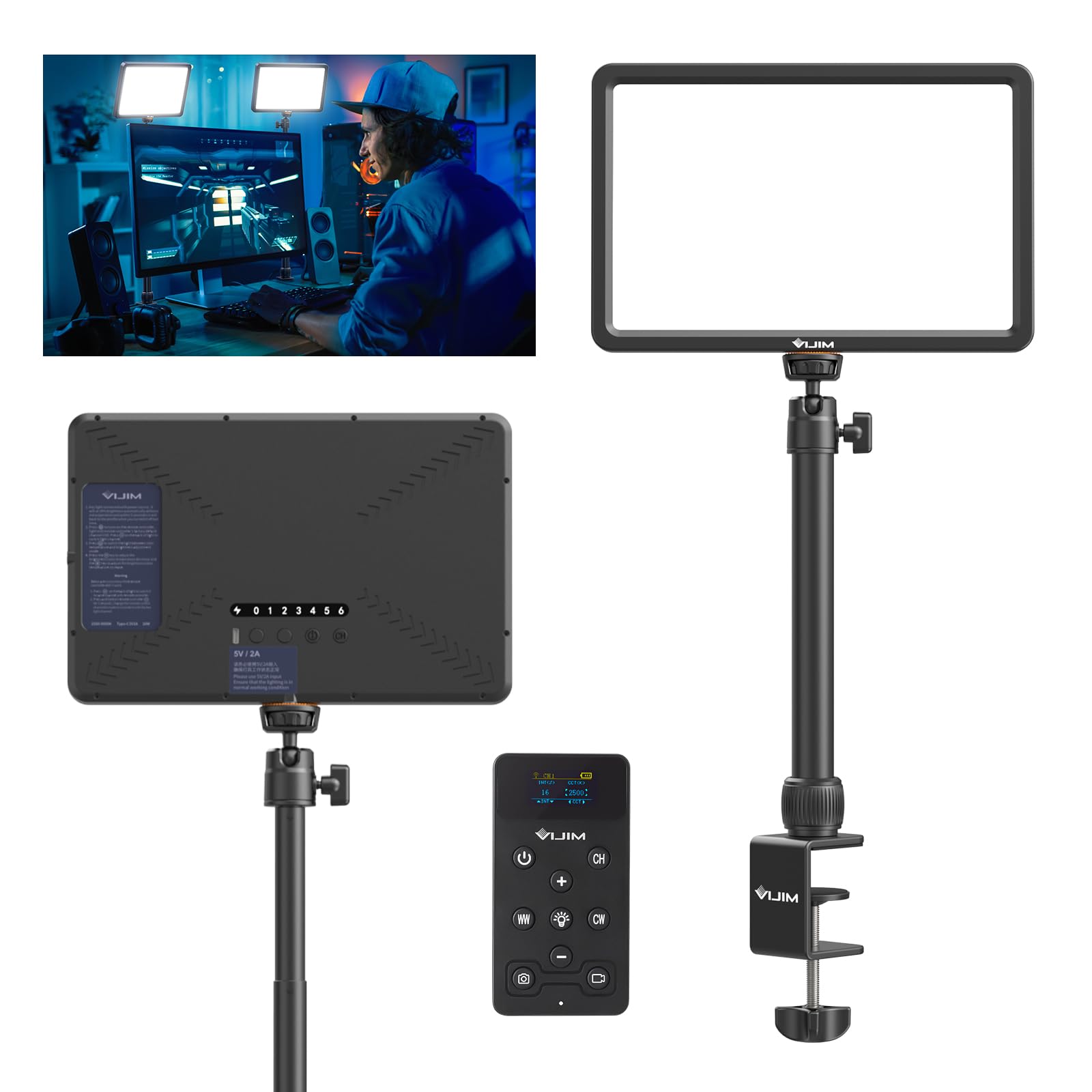
This light fixes the single biggest problem most desk streamers have: inconsistent, unflattering colour. The K20’s 2500–9000K range and CRI >90 let you match warm room lamps or cool daylight so skin tones look correct whether you stream at night or during the day. Score: 7.3/10 (Editorial Team).
Why we picked it:
- Colour control that matters — 2500–9000K gives real-world matching options you don’t get on cheaper panels.
- Reliable mid-take control — the magnetised IR remote (30m range, 7 channels) makes multi-light setups simple and immediate without opening an app.
- Practical desk fit — 11" edge-lit panel, 120° beam, metal C‑clamp and 30–80cm pole clamp cleanly to most desks and phones/webcams.
The trade-off: it’s not the brightest single-panel option (600 lm, 10W) and has no Wi‑Fi app or internal battery, so it’s not the tool for lighting a large scene or shooting on location.
Buy the K20 for £49.99 — the colour flexibility and remote alone make it a smarter first buy than a cheaper ring light. https://www.amazon.co.uk/ULANZI-Professional-Dimmable-2500K-9000K-Streaming/dp/B0DM1RB1J2?tag=tomisindev-20
Best upgrade: Elgato Key Light
Elgato Key Light — £179.99
Spend more and you get significantly more single-panel output, integrated app control, and a fuller ecosystem (Stream Deck integration, multiple official mounts). The Key Light pushes much higher lumens (Elgato models run from ~1400 lm for “Air” up to 2800 lm for the full Key Light) so one panel can be the main source for most desks and small sets.
Worth it if: you’re building a dedicated studio or need one-panel brightness to light two people or a larger backdrop.
Best budget pick: Ulanzi VL49
Ulanzi VL49 — £24.99
This tiny rechargeable panel isn’t a full replacement for a proper key light, but it nails portability and value: decent CRI, adjustable temperature, and a built-in battery that makes it useful for on-the-go shots or as a secondary accent light. Expect lower spread and less soft fill than an 11" edge-lit panel.
Worth it if: you need a second light or a travel-friendly unit for quick vlogs, not a single-source studio key.
How we chose
We prioritised: colour temperature range and CRI (because skin tone is the point), control method (remote vs app vs Wi‑Fi), real-world brightness for desk setups, and mounting flexibility. Sources: manufacturer specs, pricing checks (Amazon, Elgato, PriceSpy), and community feedback from r/Twitch and r/streaming.
Frequently asked questions
Do I need 2500–9000K? Only if you want your light to match existing room lamps or daylight and avoid green/magenta casts. 2500–9000K is overkill for some, but it makes colour-matching trivial when you mix lights.
Is £49.99 worth it compared with a £180 Elgato? Yes if you prioritise colour control and a physical remote. No if you need maximum brightness or an app ecosystem — that’s where the Elgato pays back the extra cost.
Can the K20 clamp to a monitor or a thin desk? Yes — the metal C‑clamp fits 0–50mm surfaces and the 30–80cm pole plus 360° ball head gives flexible positioning for webcams and phones.
Products in this article